09.11.2025
Wireguard VPN troubleshooting
WireGuard is a VPN tool. I am hosting WireGuard on a Virtual Private Server and using it from home.
I have experienced issues with WireGuard that were difficult to solve.
Here are the issues and how to solve them:
1. WireGuard stops working after Windows 11 update
After an update to windows 11 my WireGuard client stopped working.
To fix this I did:
Windows + Sto open the windows search menu.- Type
features oninto the search bar - Click on
Turn windows features on or off
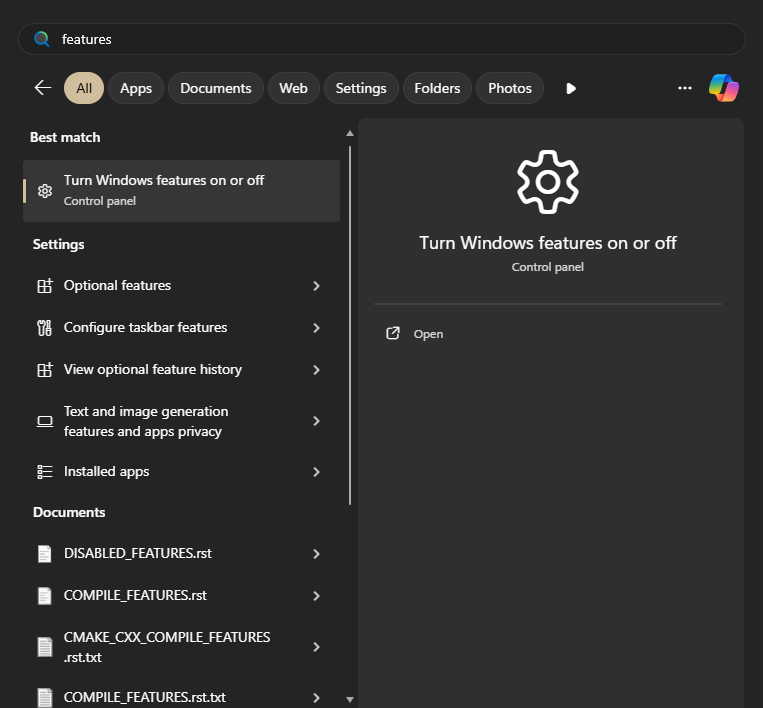
- This will open up the
Windows Featuresmenu - scroll down then click
Virtual Machine Platform
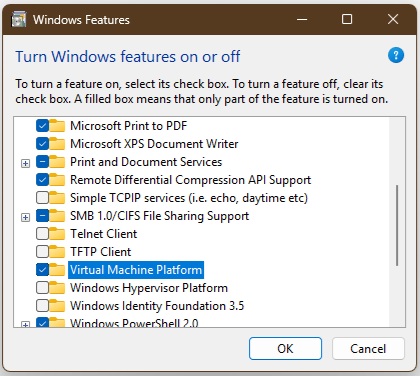
- it will take a couple minutes to install that feature
- Finally, I also had to remove the
AllowedIPs = 0.0.0.0/0, ::/0line in my client configuration of WireGuard[Interface] PrivateKey = [] ListenPort = 51820 Address = 10.200.200.5/24 DNS = 1.1.1.1 MTU = 1280 [Peer] PublicKey = [] # AllowedIPs = 0.0.0.0/0, ::/0 Endpoint = [ip]:51820
How did I solve this?
- I searched online and found this github issue that solved it.
- it links to this windows forum solution
Things I tried before:
- uninstall + reinstall WireGuard
- disable Windows Firewall
- adding Firewall inbound rules
- add exclusions for the antivirus for the WireGuard folder
Why does this work?
Windows gives some explanation:
Virtualization lets your Windows device emulate a different operating system, like Android or Linux. Enabling virtualization gives you access to a larger library of apps to use and install on your device. If you upgraded your device from Windows 10 to Windows 11, these steps help you enable virtualization.
2. WireGuard is on and I can ping, but I can't connect to websites. MTU issue
Everything seems to be working, but I can't browse the web. This turned out to be an MTU issue.
- I made my MTU lower, to 1280
[Interface] PrivateKey = [] ListenPort = 51820 Address = 10.200.200.5/24 DNS = 1.1.1.1 MTU = 1280 # <-------------- [Peer] PublicKey = [] # AllowedIPs = 0.0.0.0/0, ::/0 Endpoint = [ip]:51820 - On other machines, like my phone and other laptop the default was fine